
Frequently asked questions
Short answers to the questions merchants ask most, with a link to the full article for each.
General
What is Recipe Kit?
Recipe Kit is a Shopify app for creating, managing and showing recipes on your store. It covers recipe cards, shoppable ingredients, analytics, translations and Google Recipe Schema for SEO.
Do I need coding skills to use Recipe Kit?
No. You create recipes, change settings and pick a design in the app. When you install Recipe Kit, its guided setup opens your theme editor with the recipe card already placed on your blog posts, and you click Save.
Does Recipe Kit work with my theme?
Yes. Online Store 2.0 themes, which is most themes published since 2021, use the Recipe Kit app block, added in the theme editor. Older vintage themes use a Liquid snippet instead. Both are covered in the Installation guide.
I left setup partway. How do I finish it?
Open Recipe Kit. It picks up at the step you left. If you reached the home page, the Get the most out of Recipe Kit guide at the top starts with Finish setup. Click Continue setup.
Why do Settings, Tools and Analytics take me back to setup?
Those pages open once your first recipe is set up. Finish the guided setup and they work as normal.
How many recipes can I create?
Every paid plan includes unlimited recipes. The Free plan holds up to 5. See The Free plan.
Recipe Kit says it is not active on my theme. What do I do?
First check a blog post on your store. If the recipe card shows, Recipe Kit just cannot see how you installed it. Click I already have the new widget installed under the message in Settings. If the card does not show, see Widget not showing.
Recipes
Can I import recipes from another app or website?
Yes, several ways:
- From a URL, photo, PDF or pasted text. Click New recipe and choose Import a recipe. Recipe Kit reads the source and fills in the fields for you, then you check it and click Create. Available on every plan, including Free.
- From your existing blog posts. Tools > Import from your store scans the blog posts and pages already on your Shopify store for recipe content and turns what it finds into linked recipes.
- From a spreadsheet. Tools > CSV import creates or updates recipes in bulk, on paid plans. See Bulk recipe import and export.
On the Free plan you can have 5 imported recipes at a time, across every import method. Paid plans get more. See Subscription plans.
Which one to pick: Importing recipes you already have. For a large or unusual library, the paid Manual recipe importing service has the Recipe Kit team do it for you.
Can I export my recipes?
Yes, on every plan. Tools > CSV export downloads your recipes as a spreadsheet, and the same file can be imported again. See Exporting recipes from your store.
Can I have recipes in multiple languages?
Yes. Every label on the card, such as Ingredients, Prep Time and Print, can be renamed or translated under Settings > Translations & Labels on every plan. Automatic translation of the recipe content through Shopify Translate & Adapt is part of the Growth plan. See Translating your recipes into other languages.
Where do recipes display on my store?
Blog posts are the usual home. When you click Create on a new recipe, Recipe Kit makes a blog post for it, or uses a post you already wrote if you pick one. New recipes start as Published, and a Published recipe publishes its post. The guided setup adds the Recipe Kit block to your blog post template. If you skipped that step, see the Installation guide.
Can I display recipes on product pages or other pages?
Yes, with the Recipe Kit app block. Add the block to any page in the theme editor and put the Recipe ID in the block settings to choose which recipe shows. This works on product pages, landing pages, the home page and custom pages. The Recipe Kit (Classic) block works the same way.
On blog posts, leave the Recipe ID blank and Recipe Kit finds the linked recipe itself.
The recipekit-svelte code snippet for vintage themes works on blog posts and on store pages that have a linked recipe. The original recipekit snippet works on blog posts only. See the Installation guide.
Can I show a list of recipes, or related recipes?
Yes. The free Recipe List block shows a grid or carousel of your recipes on any page. On a blog post it shows related recipes. See Add a recipe list to any page.
Can I add FAQs to a recipe?
Yes, on the Growth plan. FAQs show under the recipe card and are published as structured data for Google. See Recipe FAQs.
Design
Can I change how the recipe card looks?
Yes. Pick one of six card designs, set your accent color, turn the card border on or off, and add your own CSS for anything else. See Customizing the recipe card.
What are the designs?
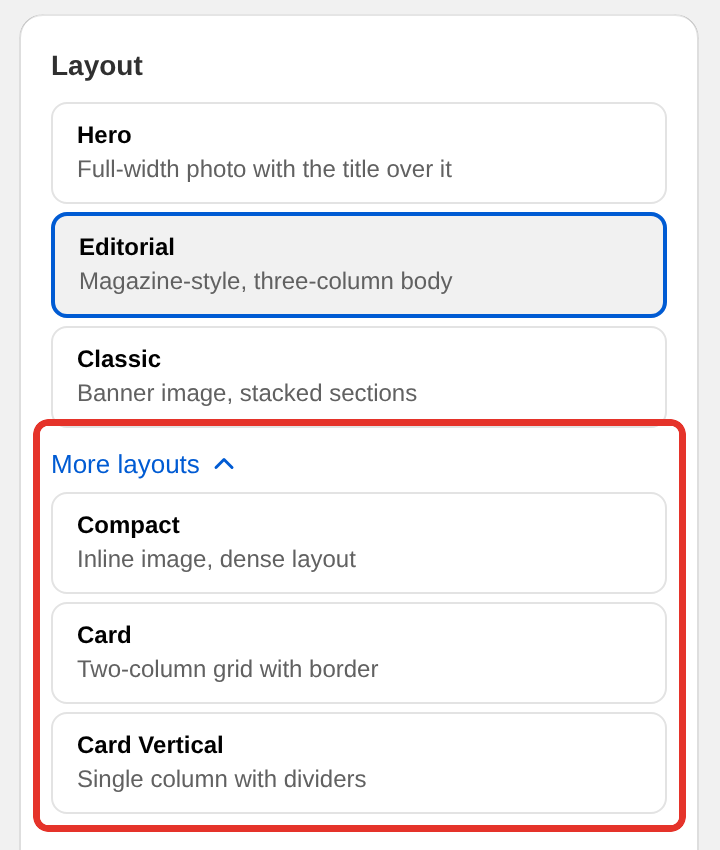
Hero (full-width photo with the title over it), Editorial (magazine style, three-column body), Classic (banner image, stacked sections), Compact (inline image, dense layout), Card (two-column grid with a border) and Card Vertical (single column with dividers). Hero and Editorial need the current Recipe Kit widget. Change the design under Layout in Settings. Every recipe updates at once. See Recipe card templates.
What size should my recipe images be?
1200 x 800 pixels, landscape. See Recipe images, sizes and alt text for how each design crops them.
Why does my recipe card look different than expected?
Check the layout selected in Settings, your accent color, any custom CSS you added, and your browser cache. A hard refresh clears most surprises. See Recipe card has a bug or looks odd?.
Shopping
Why isn't the Add to Cart button showing?
Add to Cart needs all of these:
- The Growth or Enterprise plan
- Add to Cart turned on under Features in Settings
- The ingredient linked to a product
- The product published and in stock
See Add to cart button.
Can customers add all ingredients at once?
Yes. Turn on Add All to Cart under Features in Settings, on the Growth and Enterprise plans.
What happens if a product is out of stock?
The Add to Cart button does not show for it. If a product has several variants, the variant menu lists only those in stock, and it only appears when more than one variant is available. The quantity buttons next to Add to Cart are a setting, Show shoppable quantity selector under Settings > Advanced > Widget Features.
Analytics
Which plans include analytics?
Every plan, including Free, tracks views, adds to cart, prints and shares. Revenue, conversion rates, the traffic and country breakdowns and history beyond 30 days are on the Growth and Enterprise plans. See Analytics dashboard.
Why don't I see any analytics data?
Check that your recipes are Published and getting visitors, and give it some time after publishing.
Why don't I see revenue?
Revenue needs the Growth or Enterprise plan and sales tracking. Open Recipe Kit, go to Analytics and click Turn on sales tracking. Revenue from orders placed after that shows up on the page.
Can I export analytics data?
Yes. Export PDF on the Recipe Analytics page saves the page through your browser's print window, and Export CSV on the Recipes table downloads the numbers for each recipe.
Billing
How am I billed for Recipe Kit?
Through Shopify. Charges appear on your regular Shopify bill alongside your other apps. See Managing your subscription.
Can I change plans anytime?
Yes. Open Recipe Kit, go to Settings and click View plans at the bottom. Shopify's plan page shows when the change takes effect.
Is there a free trial?
Yes. New stores get a free trial on paid plans. The current length and terms are on Shopify's plan page, which the Plan step of setup opens.
Is there a Free plan?
Yes, and it does not expire. It includes up to 5 recipes, every card design, Google Recipe Schema, printing, sharing, ratings, analytics for views, adds to cart, prints and shares, AI recipe import, and three AI recipe drafts every 30 days. Add to Cart, revenue analytics, unlimited AI drafting and step photos are on the Growth plan. See The Free plan.
What happens if I cancel?
That depends on how you stop. Switching to the Free plan stops the charges and keeps your recipe cards on your store, though you cannot create new recipes while you have 5 or more. Uninstalling Recipe Kit removes the recipe cards from your store straight away. Either way your recipes are kept, and reinstalling brings everything back. See Managing your subscription.
Technical
Does Recipe Kit slow down my store?
The widget loads without blocking the rest of the page, and it reserves its space before the content arrives, so the page does not jump around while it loads.
Does Recipe Kit work with headless stores?
Yes, on the Enterprise plan. Create your key yourself under Settings > Advanced > API access. You do not need to contact us. See Headless API access.
SEO
Does Recipe Kit help with SEO?
Yes. Recipe Kit adds Google Recipe Schema to every recipe, which is what lets your recipes show in search results with images, star ratings and cooking times.
How do I check the schema is working?
Run your recipe page URL through Google's Rich Results Test. If the results are not what you expect, see Why isn't my recipe showing in Google?.
Can I make QR codes or social images for my recipes?
Yes, on the Growth plan. See QR codes for your recipes and Share images for social media.
What's next
- Installation guide covers setup and adding Recipe Kit to your theme.
- Widget not showing covers display problems step by step.
- Contact support covers how to reach the Recipe Kit team.