
Recipe info on the blog index page
Show a recipe's star rating, prep time, cook time and servings on your blog index page, under each post in the list. This takes a small edit to your theme's code.
This works on every plan.
If you would rather not edit code, the Recipe List block shows recipe cards with time, category and rating on any page, including your blog page. See Add a recipe list to any page.
If you want us to add it for you, email [email protected] with your store URL and a screenshot of where the details should appear.
Step 1: Load the recipe
- In Shopify admin, go to Online Store > Themes.
- Click the ... button beside your theme and choose Edit code.
- Open the file that draws each post in the blog list. In Dawn and many other themes it is
snippets/article-card.liquid. Others usesections/main-blog.liquidortemplates/blog.liquid.
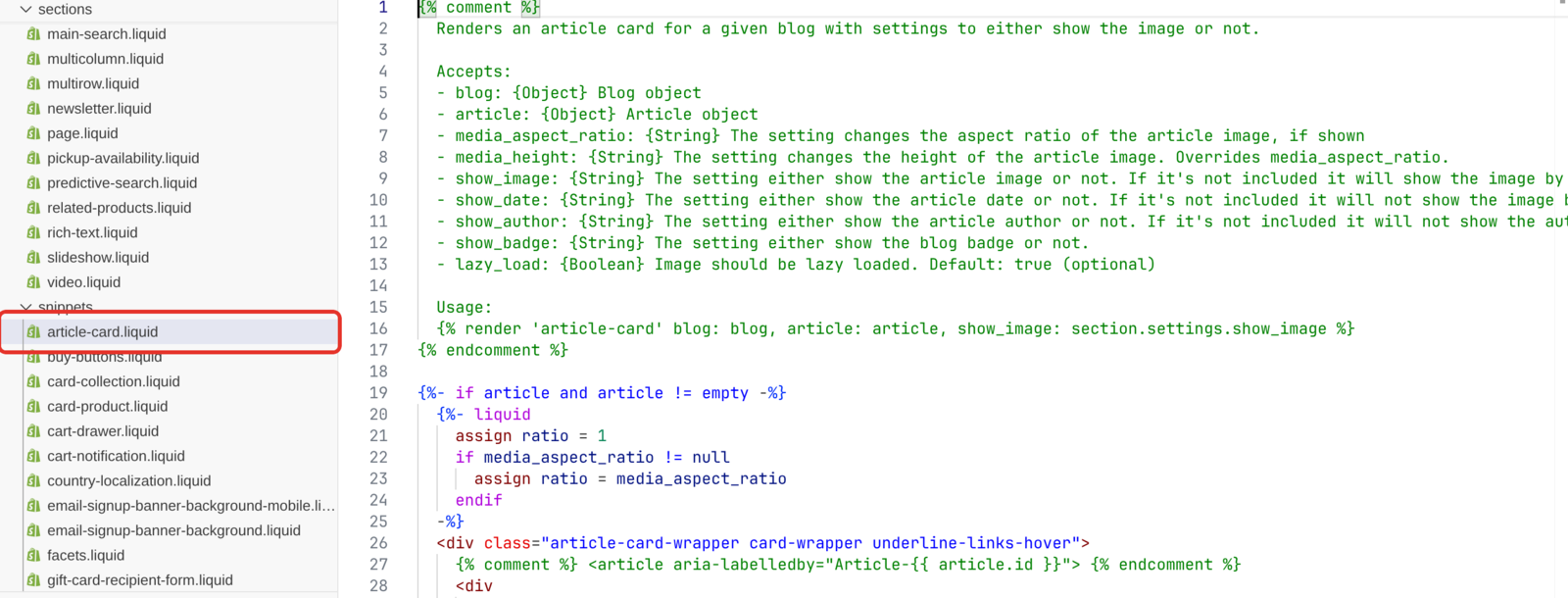
Paste this inside that file, where the article variable is available:
{%- assign rk_resource_id = article.id | downcase -%}
{%- assign rk_type = article.metafields.recipekit[rk_resource_id].type -%}
{%- if rk_type == 'json' -%}
  {%- assign rk_mf = article.metafields.recipekit[rk_resource_id].value -%}
{%- else -%}
  {%- assign rk_mf = article.metafields.recipekit[rk_resource_id] -%}
{%- endif -%}
rk_mf now holds the recipe connected to that post, or is blank if the post has no recipe. Wrap everything that follows in {%- if rk_mf != blank -%} so posts without a recipe show as normal.
Available fields
| Field | Example value |
|---|---|
rk_mf.recipe_title |
Brown Butter Chocolate Chip Cookies |
rk_mf.recipe_rating |
4.6 |
rk_mf.rating_count |
38 |
rk_mf.prep_time |
20 minutes |
rk_mf.cook_time |
1 hours 15 minutes |
rk_mf.serving_size |
24 cookies |
rk_mf.recipe_calories |
210 |
rk_mf.recipe_category |
Dessert |
rk_mf.recipe_cuisine |
American |
rk_mf.recipe_image |
The image's web address |
rk_mf.iso_prep_time |
PT20M |
rk_mf.iso_cook_time |
PT1H15M |
rk_mf.iso_total_time |
PT1H35M |
prep_time and cook_time are stored as text with their units, ready to print. Hours are always written as "hours", so one hour shows as "1 hours". The iso_ fields hold the same times in a fixed format, if you want to work out your own wording.
Category and cuisine can contain HTML, so print them with | strip_html.
Step 2: Show prep time, cook time and servings
{%- if rk_mf != blank -%}
  <div class="rk-card-meta">
    {%- if rk_mf.prep_time != blank -%}
      <span>Prep: {{ rk_mf.prep_time }}</span>
    {%- endif -%}
    {%- if rk_mf.cook_time != blank -%}
      <span>Cook: {{ rk_mf.cook_time }}</span>
    {%- endif -%}
    {%- if rk_mf.serving_size != blank -%}
      <span>Serves: {{ rk_mf.serving_size | strip_html }}</span>
    {%- endif -%}
  </div>
{%- endif -%}
Step 3: Show the star rating
{%- assign rk_count = rk_mf.rating_count | plus: 0 -%}
{%- if rk_mf != blank and rk_count > 0 -%}
{%- assign rk_stars = rk_mf.recipe_rating | plus: 0 | round -%}
<div class="rk-card-rating">
{%- for i in (1..5) -%}
{%- if i <= rk_stars -%}
<span class="rk-star rk-star--on">★</span>
{%- else -%}
<span class="rk-star">☆</span>
{%- endif -%}
{%- endfor -%}
<span class="rk-card-rating__count">({{ rk_count }})</span>
</div>
{%- endif -%}
Recipes nobody has rated yet show no stars, which is usually what you want on an index page.
Add the styling to your theme's stylesheet:
.rk-card-rating {
  display: inline-flex;
  align-items: center;
  gap: 6px;
}

.rk-star {
  font-size: 18px;
  line-height: 1;
  color: #d3d3d3;
}

.rk-star--on {
  color: #ffd700;
}

.rk-card-rating__count {
  font-size: 14px;
}

.rk-card-meta {
  display: flex;
  flex-wrap: wrap;
  gap: 12px;
  font-size: 14px;
}
Show the recipe image
Most themes already show the blog post's featured image. If you want the recipe image instead, use this. The replace filter swaps an older image address for Recipe Kit's image service, so the image loads quickly and reliably:
{%- if rk_mf != blank and rk_mf.recipe_image != blank -%}
  {%- assign rk_img = rk_mf.recipe_image | replace: 'https://f000.backblazeb2.com/file/recipekit-bucket/', 'https://images.getrecipekit.com/' -%}
  <img src="{{ rk_img }}" alt="{{ rk_mf.recipe_title | strip_html | escape }}" loading="lazy" width="600">
{%- endif -%}
Troubleshooting
Nothing appears
- Check the post is connected to a recipe. The snippet reads the recipe from the post, so a post with no recipe has nothing to show. See Linking blog posts to recipes.
- Check
articleis the right name. Some themes call the loop variable something else. Look at the{% for %}tag around your code and use the name it gives. - Check you edited the file your blog uses. Themes vary between
snippets/article-card.liquid,sections/main-blog.liquidandtemplates/blog.liquid.
It works in my main language but not in others
If you use Shopify Translate & Adapt, translated versions of a post can hand the recipe data to Liquid as plain text, and the snippet finds nothing in those languages. The recipe card on the post still works. Contact support if this affects you.
What's next
- Recipe filter and search bar covers adding filtering and search to your blog page with no code.
- Recipe categories and filtering covers the ways readers can browse your recipes, including a grid layout.
- Add a recipe list to any page covers showing recipe cards with ratings and times, no code needed.