
Move the recipe video elsewhere on the page
The recipe video sits inside the recipe card. If you want it somewhere else on the blog post, for example at the top where readers see it without scrolling, you can show it there with a Liquid snippet and hide the copy in the card.
This works on every plan. It needs an edit to your theme code. If you would rather we did it for you, contact support with your store URL and where you want the video.
Add the snippet to your theme
-
In Shopify admin, go to Online Store > Themes, click the three dots next to Customize, and choose Edit code.
-
Open your blog post template. It is usually
sections/main-article.liquid, ortemplates/article.liquidon older themes.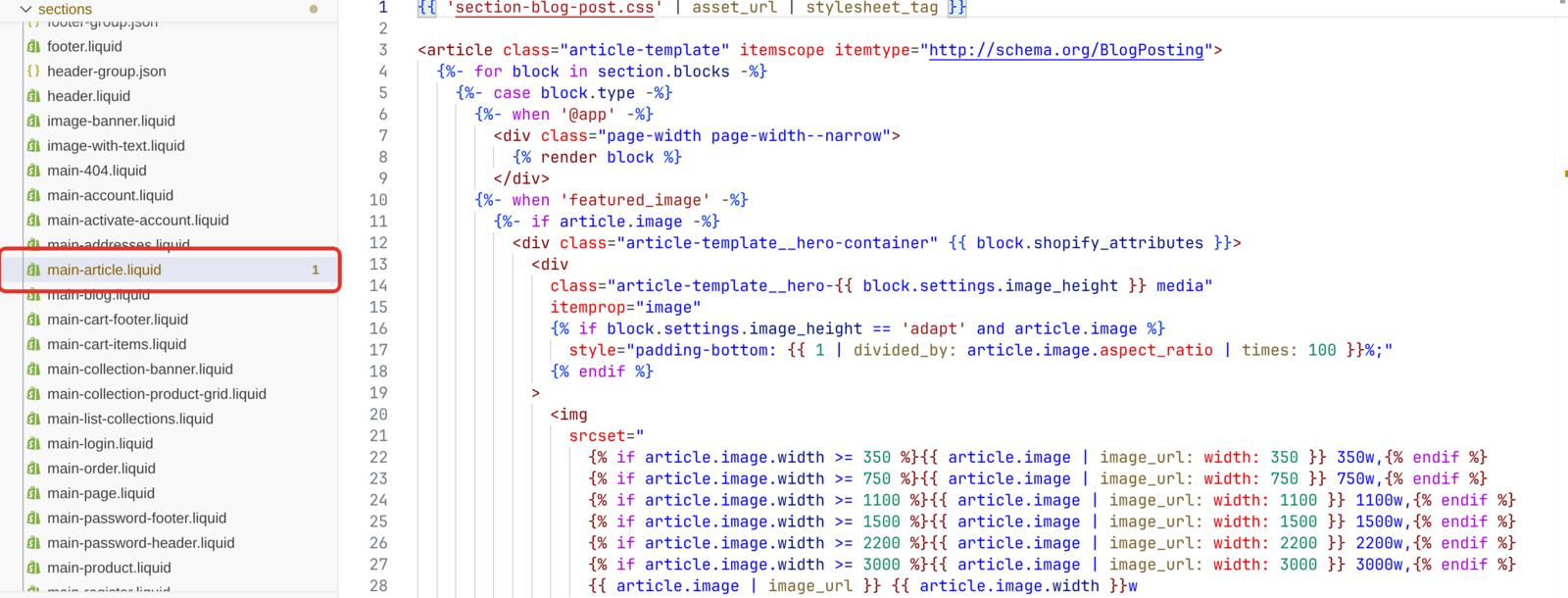
-
Paste the snippet below where you want the video to appear.
-
Click Save.
{% comment %} Recipe Kit: recipe video {% endcomment %}
{%- assign rk_resource_id = article.id | downcase -%}
{%- assign rk_type = article.metafields.recipekit[rk_resource_id].type -%}
{%- if rk_type == 'json' -%}
  {%- assign rk_mf = article.metafields.recipekit[rk_resource_id].value -%}
{%- else -%}
  {%- assign rk_mf = article.metafields.recipekit[rk_resource_id] -%}
{%- endif -%}

{%- if rk_mf.recipe_video != blank -%}
  {%- assign rk_raw = rk_mf.recipe_video -%}
  {%- assign rk_embed = rk_mf.video_embed_url -%}
  {%- assign rk_file = '' -%}

  {%- comment -%} Uploaded video files play in a video player {%- endcomment -%}
  {%- if rk_mf.video_type == 'file' -%}
    {%- assign rk_file = rk_mf.video_content_url -%}
  {%- elsif rk_raw contains '.mp4' or rk_raw contains '.webm' or rk_raw contains '.mov' -%}
    {%- assign rk_file = rk_raw -%}
  {%- endif -%}

  {%- comment -%} Recipes saved before embed links were stored: build one for YouTube and Vimeo {%- endcomment -%}
  {%- if rk_embed == blank and rk_file == blank -%}
    {%- if rk_raw contains '/watch?v=' -%}
      {%- assign rk_id = rk_raw | split: '/watch?v=' | last | split: '&' | first -%}
      {%- assign rk_embed = 'https://www.youtube.com/embed/' | append: rk_id -%}
    {%- elsif rk_raw contains '/shorts/' -%}
      {%- assign rk_id = rk_raw | split: '/shorts/' | last | split: '?' | first -%}
      {%- assign rk_embed = 'https://www.youtube.com/embed/' | append: rk_id -%}
    {%- elsif rk_raw contains 'youtu.be/' -%}
      {%- assign rk_id = rk_raw | split: 'youtu.be/' | last | split: '?' | first -%}
      {%- assign rk_embed = 'https://www.youtube.com/embed/' | append: rk_id -%}
    {%- elsif rk_raw contains 'vimeo.com/' -%}
      {%- assign rk_id = rk_raw | split: '?' | first | split: '/' | last -%}
      {%- assign rk_embed = 'https://player.vimeo.com/video/' | append: rk_id -%}
    {%- endif -%}
  {%- endif -%}

  {%- comment -%} Shorts, TikTok and Reels are tall {%- endcomment -%}
  {%- assign rk_shape = '' -%}
  {%- if rk_mf.video_type == 'tiktok' or rk_raw contains '/shorts/' or rk_raw contains '/reel/' -%}
    {%- assign rk_shape = ' rk_custom_video--tall' -%}
  {%- endif -%}

  {%- if rk_file != blank or rk_embed != blank -%}
    <style>
      .rk_custom_video { position: relative; width: 100%; aspect-ratio: 16 / 9; margin: 0 0 24px; }
      .rk_custom_video--tall { aspect-ratio: 9 / 16; max-width: 400px; margin-left: auto; margin-right: auto; }
      .rk_custom_video iframe,
      .rk_custom_video video { position: absolute; inset: 0; width: 100%; height: 100%; border: 0; background: #000; }
    </style>
    <div class="rk_custom_video{{ rk_shape }}">
      {%- if rk_file != blank -%}
        <video src="{{ rk_file }}#t=0.1" controls playsinline preload="metadata"></video>
      {%- else -%}
        <iframe src="{{ rk_embed }}" loading="lazy" title="Recipe video"
          allow="accelerometer; autoplay; clipboard-write; encrypted-media; gyroscope; picture-in-picture"
          allowfullscreen></iframe>
      {%- endif -%}
    </div>
  {%- endif -%}
{%- endif -%}
{% comment %} End Recipe Kit: recipe video {% endcomment %}
The snippet reads the recipe linked to the post. If the recipe has no video, it outputs nothing and leaves no gap.
Hide the video inside the card
Hide the card's copy of the video, or it shows twice.
- Open Recipe Kit and go to Settings.
- Click Custom CSS at the bottom of the design card.
- Add this rule and click Save.
#rk_parent #rk_video {
  display: none;
}
Check it
Reload a blog post whose recipe has a video. The video should show where you pasted the snippet and not inside the card.
Which videos it handles
- YouTube, including Shorts
- Vimeo
- TikTok and Instagram
- Video files chosen from your Shopify Files
Recipe Kit stores a ready-made player link for each video when you save the recipe. For TikTok and Instagram videos added a while ago, that link may be missing. Open the recipe in Recipe Kit and save it once to add it. YouTube and Vimeo work either way.
Shorts, TikTok videos and Instagram Reels are tall, so the snippet shows them in a narrow portrait frame. Everything else uses a 16:9 frame that scales with the page.
Troubleshooting
Nothing appears
- Check the recipe has a video. Open the recipe in Recipe Kit and look at the Recipe Video section.
- Check you edited the right file. Some themes render blog posts from
sections/main-article.liquid, others fromtemplates/article.liquidor a differently named section. - Check the post is linked to the recipe. The snippet reads the recipe from the post, so an unlinked post has nothing to find. See Linking blog posts to recipes.
- TikTok or Instagram video missing? Save the recipe once in Recipe Kit, as described above.
The video shows on one language but not another
If you translate your store with Shopify Translate & Adapt, translated versions of a post can hand the recipe to Liquid as plain text, and the snippet finds no video on those languages. The recipe card itself still works. Contact support if this affects you.
What's next
- Recipe videos covers adding a video and the supported platforms.
- Move the recipe card on your blog post covers moving the whole card.
- Custom CSS styling covers other changes to the card.