
JavaScript events
The recipe card fires a JavaScript event on the page when a shopper rates a recipe, changes the cart, shares a recipe or prints it. A developer can listen for these to show a message, update a theme, or send the action to an analytics tool.
The events fire on every plan. The cart event only fires on stores where Add to Cart is available, which is part of the Growth plan.
Where to put your code
Add your listener in either place:
- Your theme's own JavaScript file.
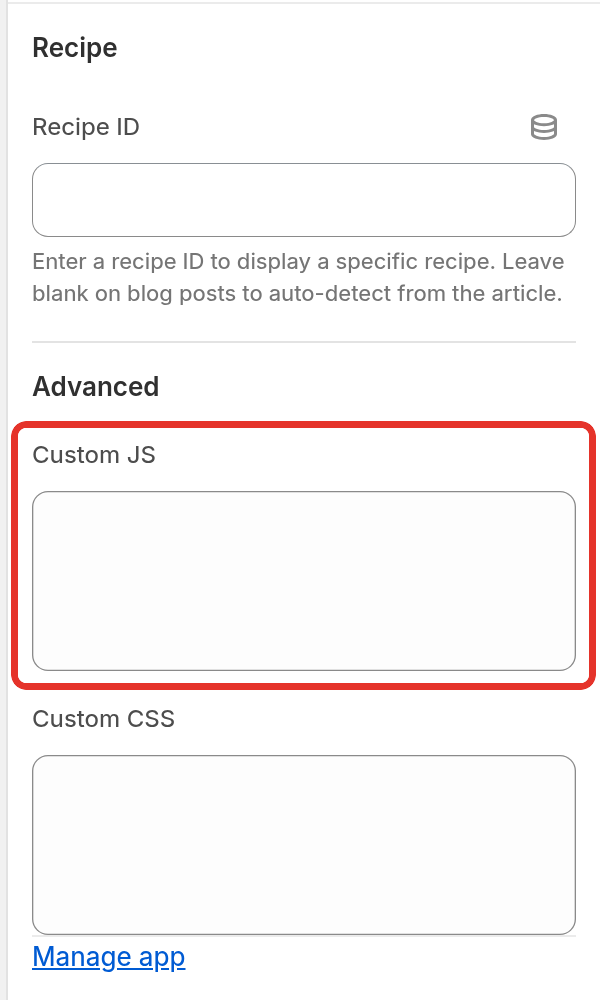
- The Custom JS box of the Recipe Kit app block. In Shopify admin, go to Online Store > Themes and click Customize. Open a blog post template, select the Recipe Kit block, and find Custom JS under Advanced. Write plain JavaScript there, without
<script>tags. Recipe Kit wraps it for you.
Every event is dispatched on document.
The events
| Event | Fires when | e.detail |
|---|---|---|
rk_rating_event |
A shopper's star rating is saved | recipeId, rating (1 to 5) |
rk_cart_event |
An item is added to, removed from or changed in the cart from a recipe card | cart, the full Shopify cart from /cart.js |
rk_share_event |
A shopper shares the recipe | recipeId, recipeTitle, platform |
rk_print_event |
A shopper clicks Print | recipeId, recipeTitle |
rk_jump_to_recipe |
A shopper clicks Jump to Recipe in the Recipe Bar | recipeId |
platform is one of facebook, twitter, whatsapp, email, pinterest, pinterest_pin, copy_link or native (the phone's own share sheet).
Rating event
One tap on a star saves the rating. If Confirm with a second tap is on in Settings > Reader tools, the first tap asks the shopper to tap again and the second one saves it. The event fires on the tap that saves the rating, at the same moment Recipe Kit sends it to be saved.
document.addEventListener('rk_rating_event', function (e) {
  var recipeId = e.detail.recipeId;
  var rating = e.detail.rating;

  // For example, thank people who leave 4 or 5 stars
  if (rating >= 4) {
    console.log('Recipe ' + recipeId + ' rated ' + rating);
  }
});
If your store still uses the older, hand-pasted Recipe Kit snippet, this event fires with no detail.
Cart event
Recipe Kit already refreshes the cart in Dawn, Horizon and themes built on them, and tries a general refresh in other themes. Use this event only when your theme's cart count or drawer still does not update after an add, or when you want to react to cart changes yourself.
document.addEventListener('rk_cart_event', function (e) {
  var cart = e.detail.cart;

  // Tell your theme the cart changed. This part depends on your theme.
  // Search its JavaScript for a function such as updateCart or refreshCart.
  console.log('Cart now has ' + cart.item_count + ' items');
});
What goes inside the listener depends on your theme. Many themes expose a function or listen for their own event. Search the theme's JavaScript for updateCart, refreshCart, cart:updated or afterCartUpdate.
If nothing else works, reload the page. It always shows the right cart, but the shopper loses their place:
document.addEventListener('rk_cart_event', function () {
  window.location.reload();
});
The older, hand-pasted Recipe Kit snippet fires the same event with the same detail.cart, but it does not refresh the theme cart for you.
Share, print and jump events
document.addEventListener('rk_share_event', function (e) {
  console.log(e.detail.recipeTitle + ' shared to ' + e.detail.platform);
});

document.addEventListener('rk_print_event', function (e) {
  console.log(e.detail.recipeTitle + ' printed');
});
The print event fires when the shopper clicks Print, just before the print page opens in a new tab.
rk_jump_to_recipe comes from the Jump to Recipe button in the Recipe Bar block, before the page scrolls to the card. See Jump to Recipe and Print buttons.
document.addEventListener('rk_jump_to_recipe', function (e) {
  console.log('Jumped to recipe ' + e.detail.recipeId);
});
Get help
If you do not have a developer and your theme's cart will not update, contact support with your store URL and theme name.
What's next
- Add to cart button covers turning on shoppable ingredients and the cart settings.
- Blog comments and written reviews covers adding written reviews alongside star ratings.
- Custom CSS styling covers changing how the card looks.