
Changing the text on your recipe card
Every heading, label and button on your recipe card can say what you want. Rename "Directions" to "Method", "Author" to "Recipe by", or write all of them in your store's language if it isn't English.
Changing labels is free on every plan. The cart labels only appear on plans with Add to Cart, which needs the Growth plan. Compare plans on the Recipe Kit app listing.
Change a label
-
Open Recipe Kit and go to Settings.
-
Expand Translations & Labels.
-
Click Customize labels.
-
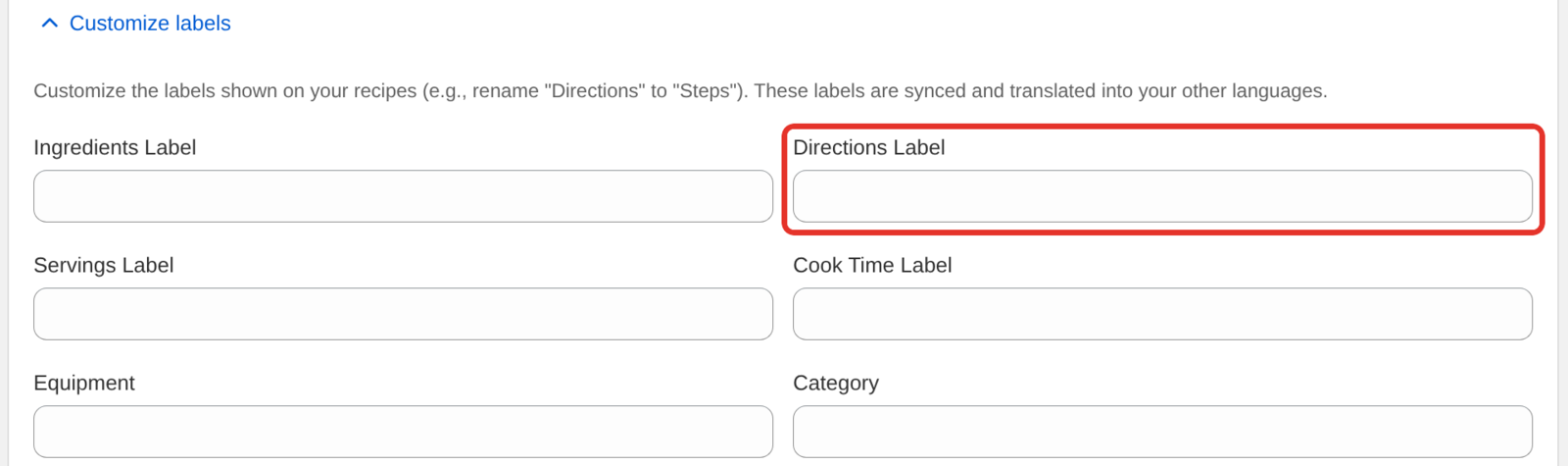
Edit the label you want to change. The four most used sit at the top: Ingredients Label, Directions Label, Servings Label and Cook Time Label.
-
Click Save in the save bar at the top of the page.

The new wording shows on every recipe, old and new.

Labels you can change
| Group | Labels |
|---|---|
| Section headings | Ingredients, Directions, Equipment, Recipe Note, Recipe Video, Recipe Nutrition, Frequently Asked Questions, Category, Cuisine, Author |
| Times and servings | Servings, Preparation Time, Cook Time, Minutes, Minute (Singular), Hours, Hour (Singular) |
| Ratings | Rating Count, Rating Thanks, Rating Confirmation Message, No Ratings Text |
| Nutrition | Each nutrient name, Grams, Milligrams, Micrograms, Nutrition Serving Size, Amount/Serving, % Daily Value, per serving |
| Buttons and steps | Cook Mode Button Text, Cook Mode Active Text, Jump to Recipe, Print Recipe, Share Recipe, Copy Link, Link Copied Message, Copy Link Failed Message, Share by Email: Message Intro, Recipe Step |
| Unit converter | Unit Toggle: Switch to US Units, Unit Toggle: Switch to Metric Units |
| Recipe List block | Recipe List: Load More, Scroll Left, Scroll Right, Go to Page |
| Share images | Share Image: More Ingredients, More Steps, Get the Full Recipe, Link in Bio, Recipe Label |
| Cart (Growth) | Add To Cart, Add All To Cart Text, Remove All Text, View Cart, Checkout, Added, Removed, Remove Quantity in Cart |
A few labels need a closer look:
- Rating Count reads "Rated current_rating stars by rating_count users". Keep
current_ratingandrating_countin your wording. Recipe Kit replaces them with the recipe's rating and number of ratings. - Rating Confirmation Message is the text a shopper sees after their first click on a star, asking them to click again to confirm.
- Jump to Recipe and Print Recipe label the Recipe Bar buttons. See Jump to Recipe and Print buttons.
- Recipe List: Go to Page reads "Go to page %page%". Keep
%page%in your wording. Recipe Kit replaces it with the page number. - The Share Image labels are the words printed on the share images you make for social media.
If a label is too long for its button, shorten it and check the card on a phone.
Your recipe content
Labels are the words around your recipes. Your recipe content, such as titles, ingredients and directions, is not changed here and stays in the language you wrote it in.
To show your recipes and labels in more than one language at the same time, see Translating your recipes into other languages. That needs the Growth plan. With translations turned on, Customize labels says "These labels are synced and translated into your other languages." The labels you set here are the source that every other language is translated from.
What's next
- Translating your recipes into other languages covers showing recipes and labels in each shopper's language.
- Customizing the recipe card covers colors, fonts and which parts of the card show.
- Creating recipes covers writing a recipe in Recipe Kit.