
Recipe status and visibility
Every recipe is either Published or Hidden. The status decides whether the recipe's blog post is live on your store, and whether the recipe shows in recipe lists and search.
Recipe status is free on every plan.
The two statuses
| Status | What it means |
|---|---|
| Published | The recipe is live. Saving it publishes its blog post if the post was a draft |
| Hidden | The recipe is saved but not shown. Saving it hides its blog post if the post was live |
Use Hidden for drafts, recipes you are still testing and out-of-season recipes. Nothing is deleted, and you can publish the recipe again at any time.
Change a recipe's status
- Open the recipe in Recipe Kit.
- In the Set visibility card on the right, choose Published or Hidden.
- Click Save.
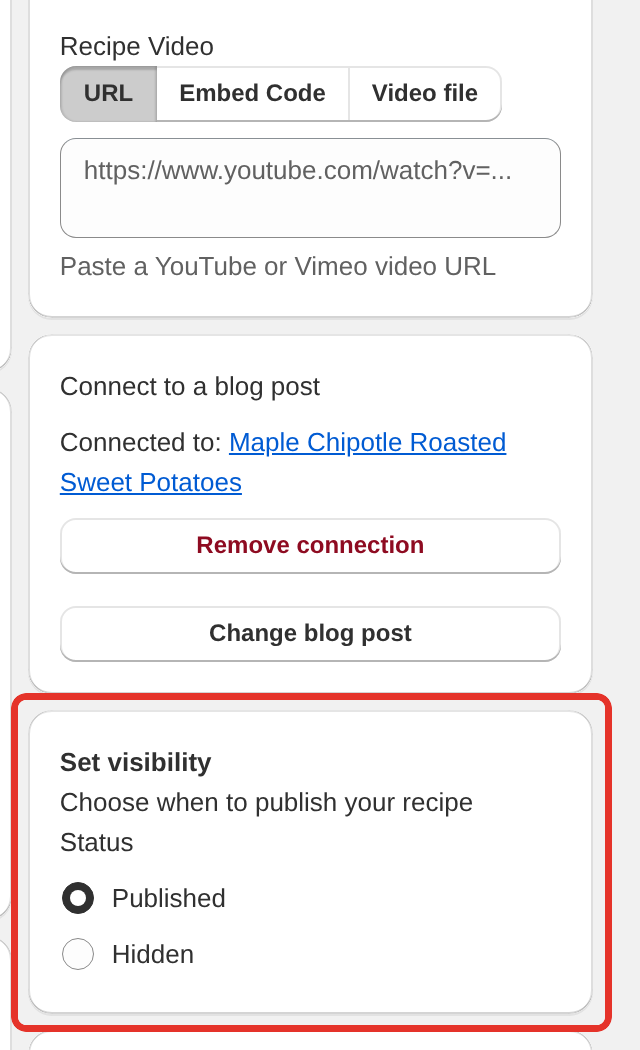
When you save, Recipe Kit updates the recipe's blog post in Shopify to match:
- Saving a Hidden recipe hides a live blog post.
- Saving a Published recipe publishes a blog post that was a draft.
- A blog post scheduled for a future date is left alone either way, so your publishing schedule stays as you set it.
Change the status of several recipes
- Open Recipe Kit. The recipe list is on the home page.
- Tick the recipes you want to change.
- Click Publish or Unpublish.
- Confirm in the Publish N recipes? or Unpublish N recipes? window.
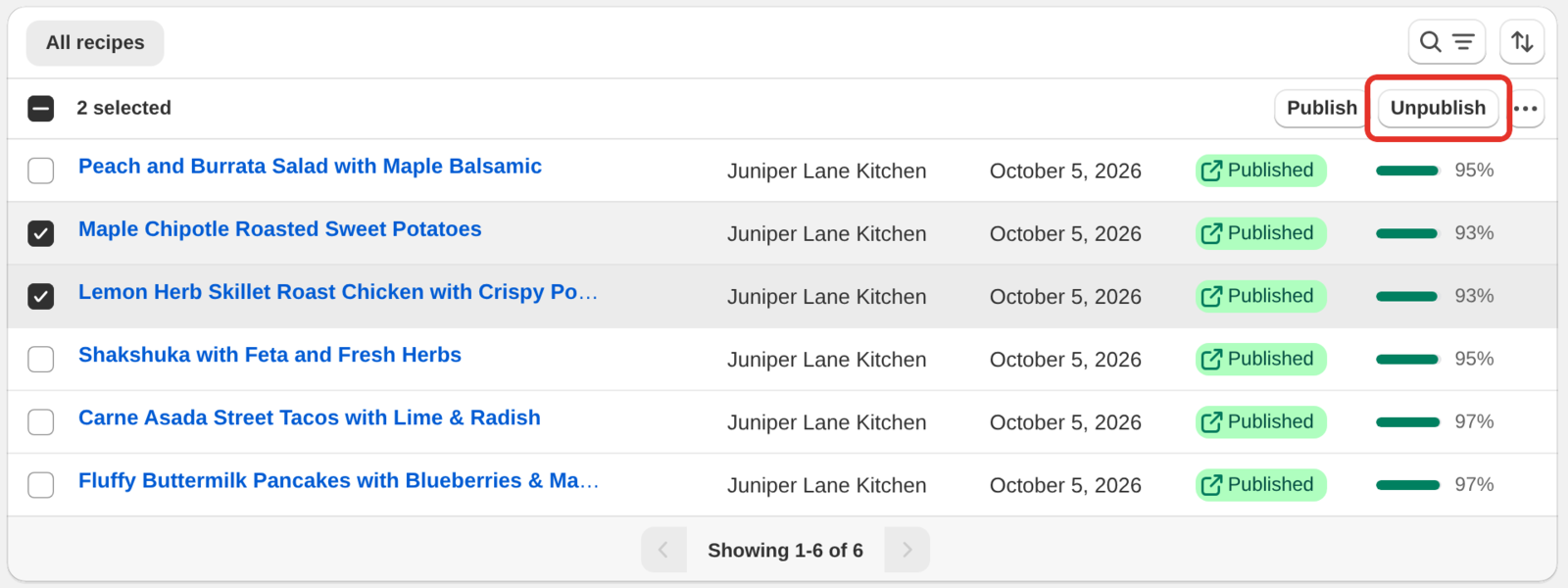
To see hidden recipes together, sort the list by Status (Hidden first). Status (Published first) does the opposite.
Where status matters
- Blog posts. Status controls whether the recipe's blog post is published, as described above.
- Recipe lists. The Recipe List block shows Published recipes only. See Add a recipe list to any page.
- Recipe search. The search bar in the Recipe Kit Filter block finds Published recipes only. See Recipe filter and search bar.
The Disconnected badge
A Disconnected badge in the recipe list means a Published recipe is not showing anywhere. Either it is not linked to a blog post, or the blog post it was linked to no longer exists. Open the recipe and connect it to a post in the Connect to a blog post card. See Linking blog posts to recipes.
Seasonal recipes
Status is a simple way to rotate seasonal content. Keep holiday or summer recipes Hidden until the season starts, publish them, then hide them again afterwards. Your work stays in Recipe Kit the whole time.
Keep a new recipe hidden while you work on it
A new recipe starts with your Default Recipe Status (Settings > Advanced). It is Published unless you changed it, and then the recipe goes live with its blog post as soon as you click Create. To finish a recipe first:
- Open Recipe Kit, click New recipe and start the recipe.
- Under Set visibility, choose Hidden.
- Click Create. The recipe and its blog post are saved, and both stay off your store.
- Add the rest of the content, the images and the linked products, and click Save as you go.
- When it is ready, choose Published and click Save. The blog post goes live.
To make Hidden the starting point for every new recipe, open Recipe Kit, go to Settings, expand Advanced and choose Hidden under Default Recipe Status. Disabled is different: new recipes start as Published, but Recipe Kit never publishes or hides their blog posts, so you manage each post's visibility in Shopify.
If several people work on recipes, the writer creates each one as Hidden. A reviewer sorts the recipe list by Status (Hidden first), checks each recipe, and publishes it, one at a time or with Publish in the recipe list.
What's next
- Creating recipes covers the rest of the recipe editor.
- Linking blog posts to recipes covers connecting a recipe to the post it shows on.
- Add a recipe list to any page covers showing your published recipes as a list.