
Open recipe links in the same tab
Links on the recipe card open in a new tab, so readers keep the recipe open while they look at a product or another page. If you would rather they open in the same tab, a short script changes that.
This works on every plan. It needs the Recipe Kit app block, or access to your theme code.
Which links open in a new tab
- Ingredients and equipment linked to a product, and their thumbnails
- The author's website link
- Links you add inside the description, notes and directions
- The share options in the Share window
The script below changes all of these except the share options, which stay in a new tab so readers do not leave your post to share it.
The Print button always opens the print page in a new tab. The script does not change it.
Add the script
- In Shopify admin, go to Online Store > Themes and click Customize.
- From the page menu at the top, choose Blog posts > Default blog post.
- Click the Recipe Kit block.
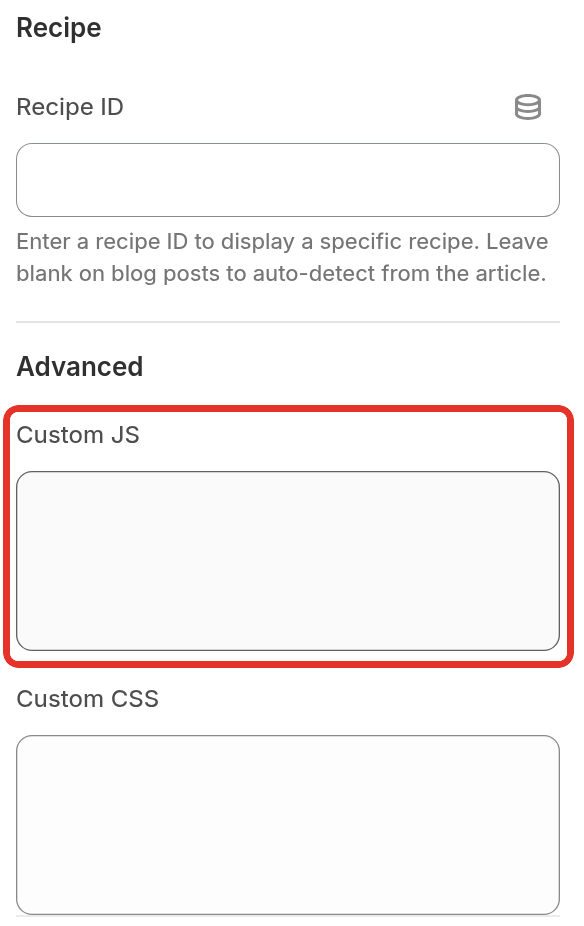
- Under Advanced, paste the script below into Custom JS.
- Click Save.
document.addEventListener('click', function (event) {
  var link = event.target.closest('#rk_parent a[target="_blank"]');
  if (link && !link.closest('.rk_share_dialog')) {
    link.setAttribute('target', '_self');
  }
}, true);
The script switches each link to the same tab at the moment it is clicked. The card loads after the rest of the page, so a script that changes the links when the page loads finds nothing to change. This one does not depend on timing.
If your store uses the Recipe Kit snippet instead of the app block, add the script to your theme's JavaScript file or inside a <script> tag in your blog post template.
Check it
Open a blog post with a recipe on it and click a linked ingredient. It should open in the same tab. If it still opens a new tab, hard refresh the page with Ctrl+Shift+R (Cmd+Shift+R on a Mac) and try again.
What's next
- Installation guide covers the app block and the snippet install.
- Custom CSS styling covers the other Advanced field on the block.
- Linking products to recipes covers the ingredient links themselves.